Online 3D printing services have broken down the walls of traditional manufacturing. This guide explores how anyone with a digital design can now create physical parts—without owning a printer or being near a factory.
Introduction
Imagine having an idea for a product, designing it on your computer, and holding a physical prototype in your hands days later—all without buying any equipment or leaving your home. That's the promise of 3D printing online.
Also called online 3D printing services, this model connects designers directly to manufacturing capacity. You upload a digital file, choose materials and finishes, and a professional service prints and ships your parts. No machines to maintain. No expertise to develop. Just results.
I've spent years at Yigu Technology watching this space evolve. What started as a niche service for hobbyists has become an essential tool for engineers, entrepreneurs, and established manufacturers. The ability to access industrial-grade 3D printing from anywhere has transformed how products get made.
In this guide, I'll walk you through how online 3D printing works, what you need to get started, how to choose the right service, and real examples of companies using it to innovate faster.
What Exactly Is 3D Printing Online?
Let's start with the basics.
The Core Concept
3D printing online is exactly what it sounds like: using internet-based services to get parts printed. You don't need a printer yourself. Instead, you upload your 3D model to a service provider, they print it on their equipment, and they ship the finished part to you.
The process follows a simple flow:
- Design your part in CAD software
- Export to a printable file format (STL, OBJ, etc.)
- Upload to an online service platform
- Select materials, finishes, and quantity
- Review the quote and place your order
- Receive finished parts at your door
Behind the scenes, the service provider handles everything: file validation, printer selection, printing, post-processing, and quality control.
How Is It Different from Owning a Printer?
| Aspect | Owning a Printer | Using Online Services |
|---|---|---|
| Upfront Cost | $200-$100,000+ | Zero |
| Maintenance | Your responsibility | None |
| Expertise Needed | Printer operation, troubleshooting | Just CAD design |
| Material Options | Limited to what you stock | Access to hundreds |
| Technology Access | One or two printer types | All technologies available |
| Speed | Immediate if printer is free | Days for shipping |
| Volume | Limited by machine size | Scales to production |
Real example: A startup needed prototypes in five different materials to test performance. Owning one printer would limit them to whatever that machine could handle. Using online services, they ordered parts in nylon, ABS, resin, and two metals—all from different providers optimized for each material.
Why Does 3D Printing Online Matter?
The impact goes beyond convenience.
Breaking Geographical Barriers
Before online services, manufacturing required proximity. You needed factories nearby or complex supply chains stretching across oceans.
Now location doesn't matter. A designer in rural Montana can access the same manufacturing capabilities as a company in Shenzhen. A startup in Brazil can prototype with German precision.
The numbers: A recent industry survey found that over 60% of small-to-medium enterprises using online 3D printing services reported significantly faster prototyping cycles—largely because they could access a global network of providers optimized for different tasks.
Lowering Barriers to Entry
Traditional manufacturing requires capital. A single injection mold costs $5,000-$50,000. A CNC machine runs $50,000-$500,000. Even a decent desktop 3D printer is several hundred dollars plus materials and maintenance.
Online services eliminate all that. For the cost of a few parts, anyone with a design can access industrial equipment:
- Hobbyists can turn ideas into physical objects
- Students can prototype projects without lab access
- Entrepreneurs can test products before investing in equipment
- Small businesses can manufacture without factory space
A jewelry designer I know started her business entirely through online services. She designs pieces in CAD, orders prints in wax or directly in metal, and sells finished products—all without owning any manufacturing equipment.
Enabling Rapid Iteration
Product development lives or dies by iteration. The more versions you can test, the better the final product.
Online services make iteration painless:
- Upload a new design today, get parts by the end of the week
- Test, learn, modify, and reorder
- Run multiple versions in parallel
Impact: Companies using online 3D printing report 2-3x more design iterations in the same development timeframe compared to traditional methods.
Fostering Innovation
When manufacturing becomes accessible, more people can innovate. Students, researchers, garage inventors—all can now create physical things that previously required factory access.
In medical fields, researchers use online services to print patient-specific anatomical models for surgical planning. A study in the Journal of Medical Devices found this reduced surgical time by 20-30% for complex procedures. Surgeons practice on exact replicas before touching real patients.
How Does the Online 3D Printing Process Work?
Understanding the steps helps you get better results.
Step 1: Create Your 3D Model
Everything starts with a digital design. You'll need 3D modeling software appropriate for your project.
Popular options:
| Software | Best For | Cost | Learning Curve |
|---|---|---|---|
| Blender | Organic shapes, artistic models | Free | Steep but well-documented |
| Fusion 360 | Mechanical parts, engineering | Free for hobbyists, paid for commercial | Moderate |
| SolidWorks | Professional engineering | Expensive | Steep |
| TinkerCAD | Beginners, simple parts | Free | Very gentle |
| Maya | Animation, complex characters | Expensive | Steep |
Key tip: Design with manufacturing in mind. Consider wall thickness, overhangs, and tolerances. Most service sites offer design guides for their specific technologies.
Step 2: Export to the Right File Format
Your CAD model must become a file that 3D printers can understand.
Common formats:
- STL (Stereolithography) – The universal standard. Represents models as triangular facets. Simple, widely compatible, but only stores geometry—no color or texture.
- OBJ (Wavefront OBJ) – Can store color, texture, and material information. Useful for multi-material or full-color prints.
- 3MF – Newer format designed specifically for 3D printing. Stores more information than STL while remaining efficient.
- STEP – For engineering applications where exact geometry matters. Some services accept native CAD files.
Best practice: Export as STL unless you need color or multiple materials. Check your model for errors before uploading—most services offer automatic checking, but catching issues yourself saves time.
Step 3: Choose Your Service Provider
Not all online services are equal. Here's how leading platforms compare:
| Platform | Strengths | Material Range | Typical Turnaround | Best For |
|---|---|---|---|---|
| Shapeways | Huge material selection, good for consumer goods | 80+ including plastics, metals, ceramics | 5-10 business days | Artists, designers, small businesses |
| Sculpteo | Strong industrial focus, good precision | Plastics, metals, elastomers | 5-10 business days | Engineering, functional parts |
| Xometry | Instant quoting, multiple technologies | Extensive engineering materials | 3-5 business days | Industrial, production runs |
| Protolabs | Fast turnaround, automated quoting | Engineering plastics, metals | 1-3 business days | Rapid prototyping, urgent needs |
| Craftcloud | Price comparison across providers | Varies by provider | Varies by provider | Best price shopping |
Factors to consider:
- Material options – Do they offer what you need?
- Technology – FDM, SLA, SLS, metal?
- Precision – Tolerances matter for functional parts
- Turnaround – How fast do you need parts?
- Price – Get quotes from multiple providers
- Reviews – Check customer experiences
Step 4: Upload and Validate
Most platforms offer automatic file checking. They'll identify potential issues:
- Walls too thin
- Gaps or holes in the model
- Non-manifold geometry (problems with surface orientation)
- Size exceeding build volume
Fix these issues in your CAD software and re-upload. A clean file prints successfully the first time.
Step 5: Select Materials and Finishes
This is where online services shine. You can choose from materials you'd never stock yourself:
Common options:
- Standard plastics: PLA, ABS, PETG for general use
- Engineering plastics: Nylon, polycarbonate for strength
- Flexible materials: TPU for gaskets, grips
- Resins: High-detail for jewelry, dental, miniatures
- Metals: Stainless steel, titanium, aluminum for production parts
- Specialty: Ceramics, wax (for casting), composites
Finishes:
- As-printed – Raw surface, fastest and cheapest
- Polished – Smooth surface for appearance
- Painted – Custom colors
- Plated – Metal coatings on printed parts
Step 6: Review Quote and Order
The platform calculates price based on:
- Material volume and type
- Print time
- Post-processing requirements
- Quantity
Review the quote, confirm your choices, and place the order.
Step 7: Receive and Inspect Parts
Parts arrive at your door, ready to use. Inspect them against your requirements:
- Dimensions match expectations?
- Surface finish acceptable?
- Function works as intended?
If something's wrong, reputable services offer reprints or refunds.
What Materials Can You Access Online?
One of the biggest advantages of online services is material variety.
Common Plastics
| Material | Properties | Best For |
|---|---|---|
| PLA | Biodegradable, easy to print, low cost | Concept models, decorative parts |
| ABS | Strong, durable, heat-resistant | Functional prototypes, end-use parts |
| PETG | Strong, chemical-resistant, food-safe | Mechanical parts, containers |
| Nylon | Very strong, tough, wear-resistant | Gears, industrial components |
| TPU | Flexible, elastic | Gaskets, seals, soft-touch parts |
Engineering Materials
- Polycarbonate – High strength, heat resistance, impact resistance
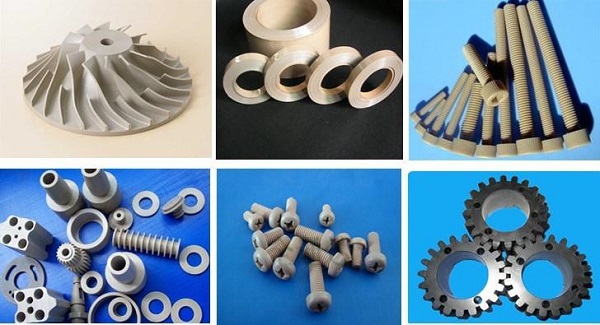
- PEEK/PEKK – Ultra-high performance, aerospace-grade
- Carbon-fiber composites – Stiff, lightweight
- Glass-filled nylons – Enhanced stiffness and stability
Metals
| Material | Properties | Typical Use |
|---|---|---|
| Stainless Steel | Strong, corrosion-resistant | Tools, brackets, functional parts |
| Titanium | Excellent strength-to-weight, biocompatible | Aerospace, medical implants |
| Aluminum | Lightweight, thermally conductive | Automotive, heat exchangers |
| Cobalt-Chrome | Wear-resistant, biocompatible | Dental, orthopedic implants |
| Inconel | Heat-resistant | Jet engine parts, high-temp applications |
Specialty Materials
- Ceramics – Hard, heat-resistant, electrically insulating
- Wax – For investment casting
- Silicone – Flexible, heat-resistant
- Biocompatible resins – Medical devices, dental applications
What Are Real-World Applications?
Online 3D printing serves industries across the board.
Automotive: Faster Development
BMW uses online services for prototyping engine components. When developing a new cylinder head, they printed multiple versions with different internal cooling channel designs. Each iteration took weeks instead of months, and the final design improved engine efficiency significantly.
Tesla has used 3D-printed sand molds (created through online services) for complex aluminum castings in the Model Y. These molds enabled intricate internal structures that improved strength while reducing weight.
Impact: Prototyping time reduced from months to weeks. Better designs reached production faster.
Medical: Patient-Specific Solutions
Hospitals use online services to create anatomical models from patient CT scans. Surgeons practice on exact replicas before operating.
A children's hospital needed a custom cranial implant for a pediatric patient. Traditional manufacturing would take weeks—too long for an urgent case. They uploaded the design to an online service, received the implant in 3 days, and successfully completed the surgery.
The numbers: Studies show surgical planning with 3D-printed models reduces operating time by 20-30% in complex cases. Less time under anesthesia means better outcomes.
Consumer Products: From Idea to Market
A startup developing a new fitness tracker used online services for every prototype. They iterated through 15 designs in 3 months—a process that would have taken a year with traditional methods. Each iteration cost $50-200 instead of thousands.
When they were ready for production, they had a fully validated design and went straight to tooling with confidence.
Aerospace: Lightweight Innovation
Aerospace engineers use online services to test lightweight bracket designs. They optimize for minimal weight, print in titanium or aluminum, and verify performance before committing to production.
One company reported weight savings of 40% on a critical bracket compared to the machined version—all validated through printed prototypes ordered online.
How Do You Choose the Right Service?
With many options available, here's how to decide.
Match Technology to Your Needs
- FDM – Large parts, functional prototypes, low cost
- SLA – High detail, smooth surfaces, visual models
- SLS – Strong parts, no supports, engineering materials
- Metal – Production-like metal parts, high performance
Consider Turnaround
- Same-day/next-day – Premium services for urgent needs
- 3-5 days – Standard for most industrial services
- 5-10 days – Economy options, often with more material choices
Evaluate Total Cost
Price per part tells only part of the story. Consider:
- Shipping costs – International vs. domestic
- Minimum order quantities – Some services have minimums
- Setup fees – Occasionally charged for complex orders
- Bulk discounts – For larger quantities
Check Quality and Support
- Customer reviews – What do actual users say?
- Design assistance – Do they help with file optimization?
- Quality guarantees – What happens if parts are wrong?
- Certifications – ISO, ITAR, etc. for regulated industries
What Challenges Should You Know?
Online 3D printing isn't perfect. Be aware of limitations.
Cost at Volume
For single parts or small batches, online services are economical. For hundreds or thousands of parts, owning equipment or using traditional methods often becomes cheaper.
Rule of thumb: Online services excel for 1-50 parts. For larger quantities, evaluate alternatives.
Shipping Time
Even with fast printing, shipping adds days. If you need parts immediately and have a printer, that's faster. But if you need capabilities you don't own, the wait is worth it.
Quality Consistency
Different providers have different quality standards. A part from one service might differ slightly from another. For critical applications, stick with reputable providers and order test parts first.
Design Limitations
Online services have the same design constraints as any 3D printing. Walls must be thick enough. Overhangs need consideration. Tolerances aren't as tight as machining. Design within the technology's capabilities.
What's the Future of Online 3D Printing?
The trend is clear: more capability, faster turnaround, lower cost.
More Materials
New materials appear constantly. Expect more engineering plastics, better metals, and specialized composites. The material library accessible through online services will keep expanding.
Faster Turnaround
As providers optimize workflows and add capacity, turnaround times shrink. Same-day and next-day options will become more common for standard parts.
Integrated Services
Look for platforms that combine 3D printing with other manufacturing: CNC machining, injection molding, sheet metal fabrication. One upload, multiple manufacturing options.
AI-Enhanced Design
Software that automatically optimizes designs for manufacturability will reduce errors and improve results. Upload a rough model, get back a print-optimized version.
Conclusion
3D printing online has truly unleashed digital manufacturing anywhere. It removes the barriers of equipment cost, technical expertise, and geographical location. Anyone with a design can now access industrial-grade manufacturing capacity.
The key takeaways:
- No equipment needed – Just upload and order
- Global access – Choose providers anywhere
- Material variety – Hundreds of options
- Fast iteration – Test designs in days
- Scales from one to many – Prototypes to production
At Yigu Technology, we've seen online 3D printing transform how our clients work. Startups prototype without capital investment. Engineers access capabilities they don't own in-house. Researchers create custom equipment on demand.
If you're not using online 3D printing services, you're missing one of the most powerful tools in modern product development. The technology is mature, the services are reliable, and the barriers have never been lower.
Frequently Asked Questions
What are the most common file formats for 3D printing online?
STL is the universal standard, supported by virtually all services. OBJ works for models with color or texture. Some services accept native CAD formats like STEP or SolidWorks files. Check your provider's requirements before uploading.
How do I choose the right 3D printing service online?
Consider material options, technology availability, precision, turnaround time, price, and customer reviews. Match your needs to provider strengths—some excel at consumer goods, others at industrial parts. Get quotes from multiple services for comparison.
What are the main challenges of 3D printing online?
Cost at volume (cheaper to own equipment for large quantities), shipping time (adds days to delivery), quality consistency between providers, and design limitations inherent to each technology. Choose reputable providers and design within capabilities.
How much does online 3D printing cost?
Varies widely by material, size, and complexity. Small plastic parts: $10-50. Medium engineering parts: $50-200. Metal parts: $100-500+. Get quotes for your specific model—most platforms offer instant pricing.
Can I print in metal through online services?
Yes. Most major platforms offer metal printing in stainless steel, titanium, aluminum, and other alloys. Metal printing costs more than plastic but delivers production-quality parts.
How fast is online 3D printing?
Typical turnaround: 3-10 business days including shipping. Expedited options (1-3 days) cost more. Some providers offer same-day or next-day for urgent needs in certain locations.
Do I need special software to prepare files?
Basic preparation happens on the service platform—they check for errors automatically. For complex models, you might use mesh repair software or CAD tools, but many services accept raw exports from popular design software.
Can I order multiple parts at once?
Yes. Most services batch multiple parts into a single build, reducing per-part cost. Upload an assembly or multiple files and they'll arrange them efficiently in the build volume.
Contact Yigu Technology for Custom Manufacturing
Ready to leverage online 3D printing for your next project? At Yigu Technology, we combine years of manufacturing experience with advanced additive capabilities. Whether you need prototypes, custom parts, or production runs, our team delivers precision results with professional quality. [Contact us today] to discuss your project—we'll help you choose the right materials, technology, and approach for your specific needs.